AI Call Answering Setup Guide for Service Businesses

AI Call Answering Setup Guide for Service Businesses
AI call answering setup is the process of deploying an intelligent system that automatically handles inbound calls, qualifies leads, and books appointments without human intervention. For service businesses, a missed call is often a missed sale. Revenue leaks quietly when phones go unanswered after hours, during peak hours, or when your team is simply stretched thin. This guide walks you through every step of a working AI call answering setup, from prerequisites and prompt design to escalation rules and troubleshooting, so you capture more leads and lose fewer customers to voicemail.
What does an AI call answering setup guide cover?
An AI call answering setup, also called an automated inbound call response system, covers the full workflow from the moment a caller dials your number to the moment their request is resolved or handed off. The industry term for the underlying technology is “conversational IVR” or “AI voice agent,” and understanding that distinction matters. Traditional IVR systems route calls with rigid menus. AI voice agents understand natural speech, qualify intent, and respond in plain language.
The role of call answering automation in a service business goes beyond answering phones. It captures lead data, confirms appointments, and pushes information directly into your CRM, all before a human agent ever picks up. That means your team spends time closing deals, not collecting names and callback numbers.

Experts recommend focusing on core intents first, specifically the 10 highest-volume customer call types, to achieve over 90% intent recognition accuracy before expanding the system. That 90% threshold is the industry benchmark for a production-ready AI call handler. Launching below it creates caller frustration and erodes trust fast.
What tools and accounts do you need before setup?
Getting the prerequisites right saves hours of rework. You need three categories of accounts before you touch a single configuration screen.
Telephony layer: A SIP trunk provider or a CPaaS platform routes your phone number to the AI system. Your existing business number can usually be ported or forwarded, so callers notice no change.
AI call platform: This is the brain of the operation. It processes speech, identifies caller intent, generates responses, and triggers actions. Look for platforms that offer no-code or low-code workflow builders, because most service business managers do not have engineering teams.
Integration targets: AI call answering platforms must sync with CRM and calendar tools like Google Calendar, Salesforce, and HubSpot to automate lead capture and scheduling. Without these connections, the AI answers calls but creates manual data entry work downstream.
Before you log into anything, pull your last 90 days of call logs. Categorize the calls by topic. You are looking for your top 10 call intents: appointment requests, price inquiries, service area questions, emergency callbacks, and so on. This list drives every configuration decision that follows.
| Setup layer | What it does | Complexity |
|---|---|---|
| Telephony (SIP/CPaaS) | Routes calls to the AI system | Low |
| AI voice platform | Processes speech and generates responses | Medium |
| CRM and calendar sync | Captures leads and books appointments | Medium |
| Routing and escalation rules | Directs calls to human agents when needed | Low to medium |
Pro Tip: If your call logs are thin or disorganized, spend one week having your team tag every incoming call by topic. That data is worth more than any software feature.
How do you set up your AI call answering workflow step by step?
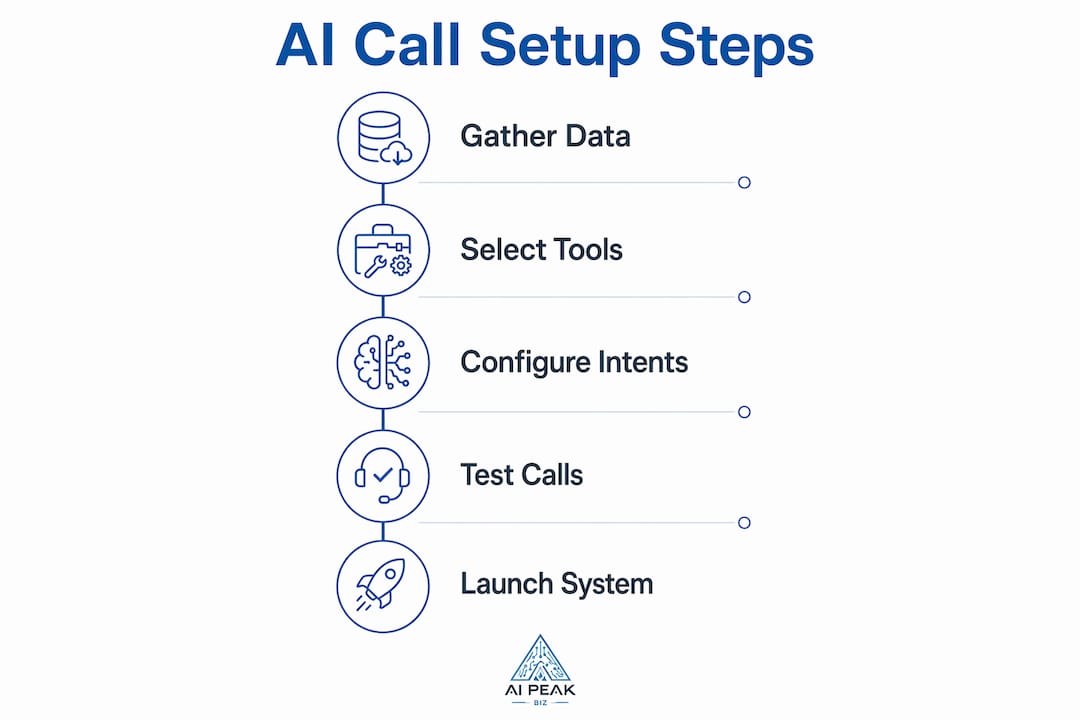
A reliable setup process follows a clear sequence: account creation, telephony connection, workflow configuration, prompt design, routing rules, and testing. Skipping steps creates gaps that show up as dropped calls or wrong transfers on day one.
-
Create your AI platform account. Choose a platform that matches your technical comfort level. No-code builders let you configure workflows visually without writing code.
-
Connect your telephony system. Forward your business number to the AI platform’s assigned number, or port it directly. Confirm that inbound calls reach the AI before moving forward.
-
Define your top 10 caller intents. Use your call log analysis from the prerequisites stage. Name each intent clearly: “book appointment,” “get a price quote,” “confirm existing booking,” “report an emergency.” Specificity here directly determines accuracy later.
-
Write your AI prompts. Each intent needs a short, conversational script. Keep AI responses under 20 words per turn. Callers hang up when responses feel like they are reading a legal document. Write the way your best receptionist talks.
-
Configure routing rules. Decide which intents the AI resolves fully and which trigger a transfer to a human agent. Emergency calls, complaints, and high-value inquiries almost always belong in the human escalation bucket.
-
Set escalation triggers. Define the exact conditions that send a call to a live agent: caller frustration signals, unrecognized intent after two attempts, or specific keywords like “cancel” or “urgent.”
-
Run demo calls. Call your own number and test every intent scenario. Record the calls and review them for accuracy, naturalness, and correct routing.
-
Measure intent recognition accuracy. If you fall below 90% on your core intents, narrow the scope before going live. Add more intents only after the core set is stable.
Pro Tip: Launch with five intents, not ten. A tight, accurate system builds caller trust faster than a wide system that guesses wrong.
What are the best practices for AI voice interaction and escalation?
The difference between a caller who stays on the line and one who hangs up often comes down to three seconds of silence or one response that sounds robotic. These practices prevent both problems.
Configuring silence thresholds and treating filler words like “um” and “uh” as continuation signals prevents the AI from cutting off callers mid-thought. Speech-to-text systems that recognize filler words maintain conversational flow. Without this setting, the AI interrupts callers constantly, and the call feels like a bad automated phone tree.
Keep every AI response under 20 words. Callers on the phone are not reading. They are listening while driving, cooking, or managing a job site. Short responses feel natural. Long ones feel like hold music with words.
Warm transfers are non-negotiable for good escalation handling. A warm transfer means the AI passes a context summary to the human agent before the call connects. Agents who read the AI summary in 10–15 seconds before engaging the caller handle calls significantly more efficiently. That skill takes 2–3 weeks of practice to become reflexive, so train your team before launch, not after.
“AI call answering succeeds when organizations design clear boundaries where AI handles routine queries, and human agents step in for complex or emotionally sensitive issues. The handoff is not a failure. It is the system working exactly as designed.”
- Design escalation policies that cover emotional calls, not just technical ones. A caller who is upset about a billing error needs a human, even if the AI technically understands the intent.
- Use AI tools for customer experience to review real call recordings and identify where callers disengage. The data tells you exactly where to adjust.
- Test your setup with accented speech and background noise before going live. 15%–25% of call samples exhibit regional accents or noise that challenges standard speech recognition models. Catching failures in testing costs nothing. Catching them on live calls costs customers.
Pro Tip: Record 20 test calls with different voices, accents, and noise levels before launch. If the system mishandles more than two, tune the speech recognition settings before going live.
How do you troubleshoot common AI call answering problems?
Most setup failures trace back to three root causes: intent scope that is too wide, integration sequencing errors, and speech processing misconfiguration.
Confidently wrong AI responses
The most damaging failure mode is an AI that answers with confidence but gives wrong information. This happens when the intent scope is too broad and the system guesses rather than recognizes. The fix is simple: reduce the number of active intents until accuracy climbs above 90%, then expand gradually.
Integration sequencing errors
Context handoff requires that AI summaries display on the human agent’s screen before the call connects. If your CRM integration fires after the call connects instead of before, agents receive no context and callers repeat themselves. Check your integration event order in the platform’s workflow settings.
VAD and STT misalignment
Voice Activity Detection and Speech-to-Text layers must be tuned together. If VAD cuts off too early, the STT layer never receives complete sentences. The result is dead zones in conversation where the AI responds to half a thought. Increase the VAD end-of-speech delay by 200–400 milliseconds and retest.
| Problem | Likely cause | Fix |
|---|---|---|
| AI gives wrong answers confidently | Intent scope too wide | Reduce to 5 core intents and retrain |
| Callers repeat themselves after transfer | Context handoff fires too late | Reorder integration event sequence |
| AI cuts off callers mid-sentence | VAD end-of-speech delay too short | Increase delay by 200–400 ms |
| Escalation never triggers | Trigger keywords too narrow | Add emotional and situational keywords |
Escalation triggers that only watch for specific keywords miss emotional cues. A caller who says “this is ridiculous” is not using a keyword, but they need a human agent immediately. Add sentiment-based triggers or a fallback rule that escalates any call where the AI fails to resolve intent after two attempts.
Key takeaways
A successful AI call answering setup requires clear intent boundaries, tight speech processing configuration, and a warm escalation workflow that puts context in front of human agents before they speak.
| Point | Details |
|---|---|
| Start with 10 core intents | Focus on your highest-volume call types to hit the 90% accuracy benchmark before expanding. |
| Integrate CRM and calendar first | Sync these tools before launch so lead data flows automatically without manual entry. |
| Keep AI responses under 20 words | Short, conversational replies hold callers on the line and reduce hang-ups. |
| Train agents on AI summaries | Agents who read call context in 10–15 seconds handle transfers faster and with fewer errors. |
| Test with real-world audio conditions | Use accented and noisy samples to catch speech recognition failures before they reach live callers. |
Where automation ends and judgment begins
I have seen service businesses spend weeks configuring AI call answering systems and then launch with 40 active intents on day one. Every single one of them called me two weeks later with the same complaint: “The AI keeps getting it wrong.” The problem was never the technology. It was the expectation that AI should handle everything from the start.
The AI phone answering approach that actually works treats the system as a lead qualifier, not a replacement for human judgment. The AI’s job is to capture intent, collect basic information, and route the call correctly. That is it. When you design around that goal, accuracy climbs fast and callers stay satisfied.
The businesses that get the most out of call answering automation are the ones that build a feedback loop between their agents and the AI. Agents flag calls where the AI misrouted or misunderstood. Those flags become training data. The system improves weekly instead of sitting static. That loop is what separates a system that works at launch from one that works six months later.
One more thing: do not skip acoustic testing. I know it feels like extra work before you have even gone live. But 15%–25% of real calls come in with noise or accent variation that breaks standard speech models. Finding that out in testing is a minor inconvenience. Finding it out from a frustrated customer is a real problem.
— Wylie
How Aipeakbiz makes AI call answering setup practical
Service businesses do not have time to become software engineers. Aipeakbiz builds AI call answering systems specifically for service industries, with pre-built workflows for real estate, coaching, salons, and more. The setup is no-code, and the Aipeakbiz team handles integration with your CRM and calendar so you are not troubleshooting API connections on a Saturday morning.
If you are in real estate, the AI front desk for real estate handles inbound inquiries, qualifies buyer and seller leads, and books showings around the clock. Coaches and service professionals can explore the AI front desk for coaches to keep their calendar full without hiring a receptionist. Aipeakbiz delivers the accuracy, the integrations, and the ongoing support that turns a setup guide into a working revenue system.
FAQ
What is AI call answering setup?
AI call answering setup is the process of configuring an automated voice system to handle inbound calls, qualify leads, and route callers to the right outcome without a human answering every call.
How many intents should I start with?
Start with your 5–10 highest-volume call types. Experts recommend reaching over 90% intent recognition accuracy on core intents before adding more.
Does AI call answering work for small service businesses?
Yes. No-code platforms and pre-built industry workflows make AI call answering accessible for businesses without technical staff, including salons, contractors, and coaching practices.
How do I handle calls the AI cannot resolve?
Configure escalation triggers for unrecognized intents, emotional language, and high-value inquiries. The AI passes a context summary to your human agent before the call connects, so the handoff feels smooth to the caller.
How long does it take to set up an AI call answering system?
A focused setup covering account creation, telephony connection, core intent configuration, and testing can be completed in under 30 minutes for straightforward deployments, though full optimization takes several weeks of live call feedback.
Recommended
- AI Answering Service vs. Traditional Answering Service: Which Is Right for Your Business? | AI Peak Biz
- AI in Home Service Businesses: Your 2026 Guide | AI Peak Biz
- AI Voice Assistant for HVAC Companies: 24/7 Call Handling That Books Jobs | AI Peak Biz
- The Role of AI in Service Call Management | AI Peak Biz
Want to see what your business is losing?
Take our free revenue assessment and find out how much missed calls, slow follow-up, and dormant leads are costing you every month.
Take the Free Assessment