How AI Handles Overflow Inquiries for Service Businesses

How AI Handles Overflow Inquiries for Service Businesses
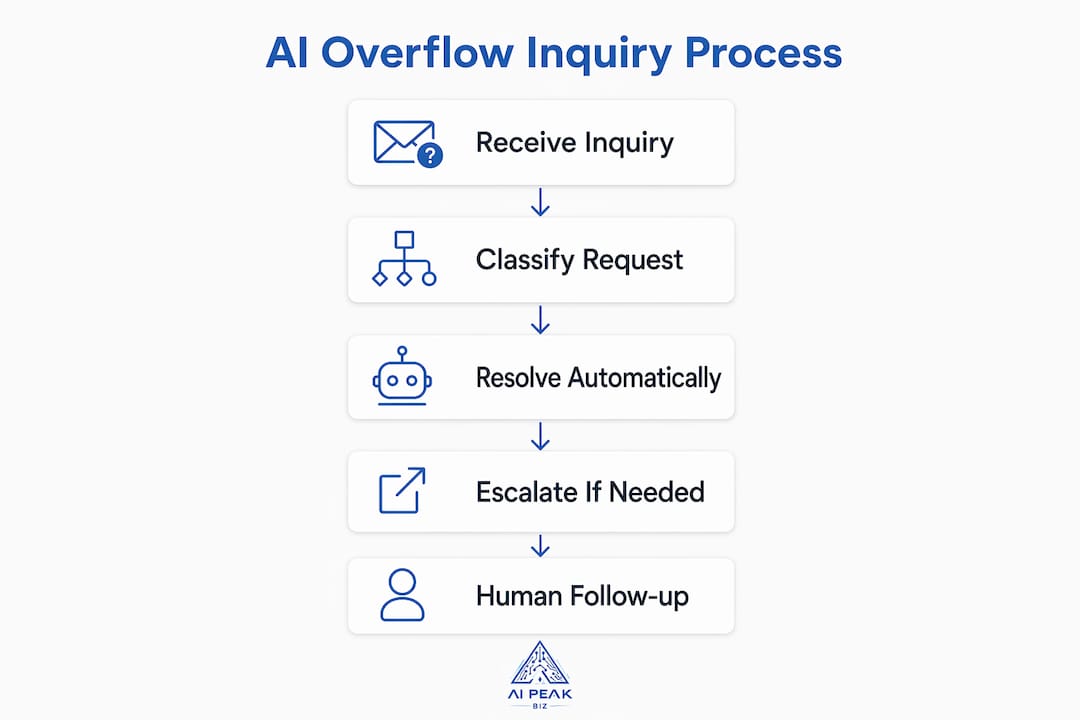
AI overflow inquiry management is defined as the automated process of receiving, classifying, resolving, and routing excess customer inquiries when human staff capacity is exceeded. When your phones ring off the hook and your inbox fills faster than your team can respond, revenue leaks quietly through every unanswered message. Understanding how AI handles overflow inquiries gives you a clear path to recovering those lost leads, booking more appointments, and keeping customers satisfied around the clock.
How does AI handle overflow inquiries?
AI handles overflow inquiries through coordinated multi-agent systems, not a single chatbot answering questions in sequence. The industry term for this architecture is “agentic AI support,” where specialized agents each perform a distinct role: triage, resolution, and handoff.

The triage agent reads each incoming inquiry, classifies the customer’s intent, and scores urgency. It does not resolve the ticket itself. A separate resolution agent then pulls from your knowledge base, customer records, and booking systems to deliver an answer or complete a task like scheduling an appointment. If neither agent can close the loop, a handoff agent transfers the conversation to a human with full context attached.
Natural language processing (NLP) powers the classification step. NLP lets the AI read plain conversational text, identify what the customer actually wants, and match that intent to a predefined category. This is why a customer typing “I need to move my appointment” and another typing “can we reschedule?” both get routed correctly, even though the phrasing differs.
- Intent classification: Sorts inquiries by topic and urgency before any response is generated.
- Sentiment analysis: Detects frustration or distress signals that trigger faster escalation.
- CRM and helpdesk integration: Passes customer history into every interaction so agents never start from scratch.
- Knowledge base access: Lets resolution agents answer FAQs, pricing questions, and policy details without human involvement.
Pro Tip: Connect your AI system to your CRM from day one. Without customer history, the AI answers generically. With it, the AI personalizes every response and reduces repeat contacts.
The enterprise AI agent playbook confirms that escalation decisions use multiple signals beyond confidence scores alone, including intent type, sentiment, and hard triggers. Relying on confidence scores alone causes both over-escalation and under-escalation.
How does AI maintain service quality during volume spikes?
Well-configured AI systems resolve 60%–80% of routine inquiries automatically. That figure means your human team only touches the remaining 20%–40%, which are the cases that actually require judgment, empathy, or specialized knowledge.
The practical effect on your business is significant. During a surge, such as a seasonal promotion, a viral social post, or a local news mention, your call volume can spike five times above normal. AI infrastructure acts as burst capacity during these events, resolving cases end to end rather than simply deflecting them to voicemail. Customers get real answers, not hold music.
Proactive AI communication cuts incoming volume before it even builds. Automated appointment reminders, status updates, and follow-up texts answer questions customers were about to ask. One documented example shows a business reducing refund requests by 40% simply by sending automated delivery updates. Fewer inbound questions means less pressure on your team during peak periods.
The benefits of AI in handling inquiries extend beyond speed:
- 24/7 availability: Inquiries submitted at 11:00 PM get answered immediately, not the next morning.
- Consistent accuracy: The AI gives the same correct answer every time, eliminating the variation that comes from a tired or undertrained staff member.
- Lead capture during off-hours: Prospects who would have called a competitor get qualified and booked while you sleep.
- Reduced wait times: Resolution times drop to under 5 seconds on high-performing implementations, compared to minutes or hours with human-only queues.
What escalation strategies keep AI handoffs smooth?
Escalation design is the part of AI overflow management that most business owners underestimate. A poorly designed escalation creates what practitioners call the “handoff wall,” where a customer repeats their entire story to a human agent who has no idea what the AI already tried. That experience destroys trust faster than a long wait time.
Effective escalation follows a clear priority order:
- Hard triggers: The AI escalates immediately when a customer mentions legal action, a safety concern, or explicitly asks for a human. No confidence score overrides this rule.
- Sentiment detection: Repeated expressions of frustration, profanity, or distress signals trigger escalation before the customer reaches a breaking point.
- Turn limits: A hard limit of 4 conversation turns before forced escalation prevents the AI from looping endlessly on a problem it cannot solve.
- Category thresholds: High-stakes inquiry types, such as billing disputes or safety complaints, escalate more readily than routine scheduling questions.
The solution to the handoff wall is the context packet. When the AI transfers a conversation, it passes a summary of the full exchange, the customer’s history, the sentiment score, and every action the AI already attempted. Human agents resolve issues faster when they receive this packet because they never ask the customer to repeat themselves.
Pro Tip: Write your handoff messages carefully. A message that confirms the customer’s request, explains what the AI already did, and sets a realistic wait time reduces frustration during the transfer. Customers who feel heard during escalation are far more forgiving of wait times.
Well-designed handoff messages that confirm customer requests and set wait expectations measurably reduce frustration during escalation. This is a detail most AI deployments skip entirely.
How does AI reshape your support team’s daily work?
The most persistent myth about AI managing customer inquiries is that it eliminates support jobs. The reality is the opposite. AI restructures teams toward specialized roles rather than shrinking headcount. Frontline agents stop answering the same five questions all day and start handling the complex cases that actually require human skill.
New roles emerge when AI takes over tier-1 volume:
- AI operations specialists: Monitor AI performance, flag errors, and tune escalation thresholds.
- Content managers: Maintain the knowledge base the AI draws from, keeping answers current and accurate.
- Escalation coaches: Review transferred conversations to identify patterns where the AI consistently fails and needs retraining.
“AI does not shrink support teams. It transforms them. Freed frontline staff focus on relationship-building and complex consultations that no algorithm can replicate. The businesses that win are the ones that redesign roles intentionally rather than waiting for the change to happen to them.”
Feedback loops are the engine that keeps AI performance improving over time. Every escalated conversation is a data point. When your AI operations specialist reviews why a particular inquiry type keeps reaching a human, they can update the knowledge base, adjust the escalation threshold, or retrain the intent classifier. Without this loop, AI performance plateaus quickly.
The team shape changes, but the work becomes more meaningful. Your staff spend their hours on relationship-building, complex consultations, and the kind of customer experience improvements that generate referrals and repeat business. That is a better use of skilled people than answering “what are your hours?” for the hundredth time.
Key Takeaways
AI overflow inquiry management works because it combines automated resolution, smart escalation, and continuous human oversight to handle demand spikes without sacrificing service quality.
| Point | Details |
|---|---|
| Multi-agent architecture | Triage, resolution, and handoff agents each play a distinct role rather than one AI doing everything. |
| 60%–80% automation rate | AI resolves the majority of routine inquiries, leaving human agents free for complex cases. |
| Hard escalation triggers | Legal mentions, safety concerns, and explicit human requests always override AI confidence scores. |
| Context packets prevent frustration | Passing full conversation history to human agents eliminates the need for customers to repeat themselves. |
| Team roles shift, not shrink | AI creates AI ops, content management, and escalation coaching roles while freeing frontline staff for high-value work. |
What I’ve learned about AI overflow handling that most guides skip
I’ve seen business owners deploy AI for overflow inquiries and declare victory after the first week. Then month two arrives, the AI starts giving slightly off-brand answers, escalation rates creep up, and nobody knows why. The missing piece is almost always the shadow mode phase.
Deploying AI in shadow mode means the system drafts responses for human review before anything goes live to customers. It feels slow. Business owners push back on it constantly. But the teams that skip this phase hit tone problems, policy violations, and customer complaints in the first 30 days. The teams that run shadow mode for two to four weeks catch those issues before they reach a single customer.
The second thing most guides miss is that escalation design is the highest-leverage decision you make in the entire deployment. You can have a mediocre knowledge base and still deliver a good customer experience if your escalation is clean. You can have a brilliant knowledge base and destroy customer trust if the handoff is clumsy. I have watched businesses invest months in AI content and spend two hours on escalation logic. That ratio is backwards.
My honest advice: treat your AI system as a customer experience tool first and a cost-reduction tool second. The businesses that frame it as pure cost-cutting tend to under-invest in escalation design, skip shadow mode, and neglect feedback loops. The businesses that frame it as a way to serve more customers better tend to get both outcomes. They save money and they grow. For a practical starting point, the AI call answering setup guide walks through implementation in a way that keeps the customer experience front and center.
— Wylie
Aipeakbiz handles overflow so your leads never go unanswered
Service businesses across real estate, coaching, marketing, and hospitality use Aipeakbiz to put overflow inquiry management on autopilot. The Aipeakbiz AI front desk answers calls and texts instantly, qualifies leads, books appointments, and escalates to your team only when a human touch is genuinely needed.
No lead slips through during a busy afternoon or a late-night inquiry surge. The system works around the clock, captures every prospect, and passes clean context to your staff when escalation is required. Whether you run a hair salon, a coaching practice, or a real estate office, Aipeakbiz fits your workflow without a lengthy setup process. Explore the AI chatbot for service businesses to see how it handles your specific inquiry types and volume.
FAQ
What is AI overflow inquiry management?
AI overflow inquiry management is the automated handling of customer inquiries that exceed human staff capacity, using AI agents to resolve, triage, and escalate contacts without adding headcount.
How does AI decide when to escalate to a human agent?
AI escalates based on hard triggers such as legal mentions or explicit human requests, sentiment signals indicating frustration, and turn limits, typically four conversation turns, before forcing a handoff.
Does AI replace customer support staff?
AI does not replace support staff. It restructures teams by removing tier-1 repetitive tasks and creating new roles in AI operations, content management, and escalation quality assurance.
What percentage of inquiries can AI resolve without human help?
Well-configured AI systems resolve 60%–80% of routine inquiries automatically, leaving the remaining 20%–40% for human agents to handle.
What is a context packet and why does it matter?
A context packet is the summary of conversation history, customer data, sentiment scores, and AI actions passed to a human agent during escalation. It prevents customers from repeating themselves and speeds up resolution.
Recommended
Want to see what your business is losing?
Take our free revenue assessment and find out how much missed calls, slow follow-up, and dormant leads are costing you every month.
Take the Free Assessment